Skip to content
DentalNexa

AI RECEPTIONIST FOR DENTAL PRACTICES

DentalNexa iVoice

Answers your phones when your front desk can't.

When your team is with patients, on another line, or the office is closed, iVoice answers, finds out what the caller needs, and turns it into an appointment request or a callback your staff can act on — or, if you schedule in DentalNexa, books the visit once the caller confirms the time.

Status: in live-call validation. We switch iVoice on for a practice only after test calls with your team.

iVoice
Incoming call · after hoursFictional caller asks for a cleaning
  1. Greets the caller in English or Spanish
  2. Confirms who is calling before discussing visits
  3. Books after the caller confirms a real open time — or takes a request for your team
  4. Saves the outcome, transcript and any follow-up task
Request for staffCallback taskBooked (DentalNexa calendar)
Illustration — fictional caller, not real patient data.

SEE IT BEFORE YOU DECIDE

See the real product

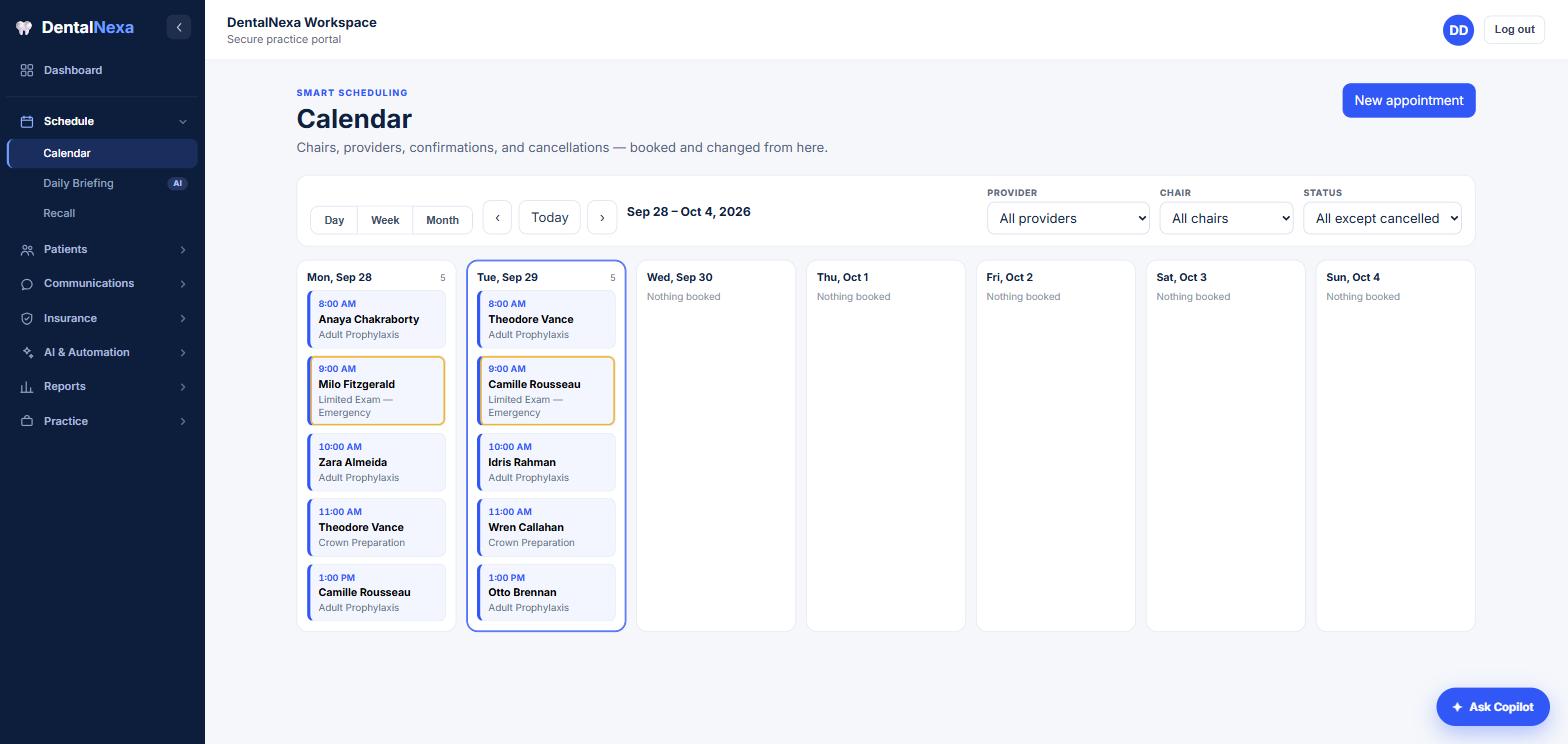
The DentalNexa calendar in week view, showing appointments for synthetic demo patients
Actual DentalNexa screen — the calendar iVoice books into. Synthetic demo-practice data, not real patients.

In a live demo, we'll show you

  • How iVoice is set up for a practice: hours, appointment rules, transfer number and scripts
  • The English and Spanish scripts your team reviews and publishes
  • What a call leaves behind: outcome, transcript, summary, and the request, task or appointment it created
  • How staff-assisted scheduling works if you keep your current practice software
Request a Live Demo

HOW A CALL IS HANDLED

Your team stays in charge of the schedule

  1. 1

    Answers when you choose

    Every call, only after hours, or only when your lines are busy. You forward your office number to iVoice's number for the times you pick.

  2. 2

    Finds out what the caller needs

    New or existing patient, the reason for the call, and a good callback number. It confirms an existing patient's identity before discussing their visits.

  3. 3

    Books, or hands it to your team

    With the DentalNexa calendar it offers real open times and books only after the caller confirms one. Otherwise it records a request, tells the caller the office will call to confirm, and creates a follow-up task.

  4. 4

    Leaves a clear record

    Outcome, transcript, summary and any task appear in your workspace, so the next person picks it up without replaying the call.

When your staff stay involved

  • Caller asks for a person — transferred to your office number when the office is open, otherwise a callback request
  • No suitable time — offers another day or a callback; it never invents a time
  • Changes within 24 hours of a visit — passed to staff rather than made by the AI
  • Pain, swelling or a broken tooth — transferred to your team, or a priority callback task when no one can answer
  • A possible emergency — the caller is told to hang up and call 911
  • Caller declines to confirm, or details don't match — nothing is changed; a person follows up
Multilingual AI voice

Speak your patients' language

Welcome patients with multilingual AI voice assistance for common questions, appointment requests, and communication with your practice.

  • English
  • EspañolSpanish
  • 中文Mandarin Chinese
  • Tiếng ViệtVietnamese
  • 한국어Korean
  • العربيةArabic
  • فارسیPersian
  • РусскийRussian
  • FrançaisFrench
  • PortuguêsPortuguese
  • हिन्दीHindi

Included for every practice, with nothing to switch on: the AI receptionist answers in the caller's language. Call scripts, text messages and reminders are written in English and Spanish.

Languages

The AI receptionist can take calls in the first group once it is switched on for your practice. Our voice platform covers the others too — ask us if your patients need one of them.

55 languages

Included for every practice

  • English
  • EspañolSpanish
  • 中文Mandarin Chinese
  • Tiếng ViệtVietnamese
  • 한국어Korean
  • العربيةArabic
  • فارسیPersian
  • РусскийRussian
  • FrançaisFrench
  • PortuguêsPortuguese
  • हिन्दीHindi

More languages — on request

  • Afrikaans
  • ՀայերենArmenian
  • Azərbaycan diliAzerbaijani
  • BosanskiBosnian
  • БългарскиBulgarian
  • 粵語Cantonese
  • CatalàCatalan
  • HrvatskiCroatian
  • ČeštinaCzech
  • DanskDanish
  • NederlandsDutch
  • SuomiFinnish
  • GalegoGalician
  • DeutschGerman
  • ΕλληνικάGreek
  • עבריתHebrew
  • MagyarHungarian
  • ÍslenskaIcelandic
  • Bahasa IndonesiaIndonesian
  • ItalianoItalian
  • 日本語Japanese
  • ಕನ್ನಡKannada
  • Қазақ тіліKazakh
  • LatviešuLatvian
  • LietuviųLithuanian
  • МакедонскиMacedonian
  • Bahasa MelayuMalay
  • मराठीMarathi
  • नेपालीNepali
  • NorskNorwegian
  • PolskiPolish
  • RomânăRomanian
  • СрпскиSerbian
  • SlovenčinaSlovak
  • SlovenščinaSlovenian
  • KiswahiliSwahili
  • SvenskaSwedish
  • TagalogTagalog (Filipino)Speech recognition for Filipino comes from a provider that handles one language at a time, so it cannot share an assistant with English or Spanish.
  • தமிழ்Tamil
  • ไทยThai
  • TürkçeTurkish
  • УкраїнськаUkrainian
  • اردوUrdu
  • CymraegWelsh

Voice platform coverage checked October 19, 2026.

WHAT WORKS TODAY

What you can use now, and what isn't ready yet

In live-call validation: the AI receptionist is built, and we can walk you through it in a live demo. It is switched on for a practice only after test calls with that practice's team. It has not yet handled live patient calls at a customer practice.

Works today

  • Patient records and appointment calendarProviders, chairs, appointment types, and day, week and month views.
  • Two-way patient textingOne inbox for texts and replies. Your texting number is set up by our team during onboarding.
  • Confirmation requests by textStaff send the request; a patient's YES reply marks the visit confirmed.
  • Recall list and follow-up outreachFind overdue patients, review the suggested message, and send it. Included with Front Desk.
  • Communication permissionsText, call and email permission recorded separately, with who recorded it. STOP replies are honored automatically.
  • Insurance work queueSee which patients are missing insurance or need verification, and record verifications your team completes by phone or portal.
  • Production and collections reportsThe appointments and payments behind each day's totals.
  • Automatic appointment remindersReminders, confirmations and follow-up texts that go out on their own at the times you choose. Off until an owner turns each one on.

Built — in live-call validation

  • AI receptionist answers callsAround the clock, after hours only, or only when your lines are busy — your choice.
  • Appointment requests for your front deskIf you don't schedule in DentalNexa, iVoice takes the request and creates a follow-up task. Callers are told the office will call to confirm.
  • Booking in the DentalNexa calendarBooks, moves or cancels only after the caller confirms the time, using your real provider, chair and hours rules.
  • Transfers and callback requestsTransfers to your office number when the office is open; otherwise records a callback request for your team.
  • English and SpanishPractice scripts in both languages, chosen from the patient's preferred language.
  • Call history, transcripts and summariesEach call's outcome, transcript and summary in the practice workspace.

Not available yet

  • Integration with Dentrix, Eaglesoft, Open Dental or other practice softwareiVoice cannot read or write another system's schedule yet. Your team books from the request instead.
  • Call-recording playbackRecordings can be kept by the voice provider, but they cannot be played back in DentalNexa yet.
  • Electronic insurance eligibility checksLive checks start after our first confirmed check through our insurance connection.
  • Digital forms and advanced reportsIntake forms and deeper schedule and recall reports.
  • Multi-location management and online checkoutEach account is one practice location today, and plans are activated by our team rather than bought online.

"Works today" items are part of the DentalNexa platform plans. Outbound texts and calls go only to patients with the matching permission, and automated outreach stays off until a practice owner approves it.

SCHEDULING COMPATIBILITY

Can I use this without replacing my current dental software?

Yes — iVoice takes appointment requests and your team books them in the software you use today. It books appointments itself only into DentalNexa's own calendar.

Keep your software: staff-assisted

iVoice collects the caller's details and preferred times, tells them the office will call to confirm, and creates a follow-up task for your front desk. It never tells a caller a request is a booking. This is the default.

Schedule in DentalNexa: direct booking

If your practice runs its schedule in DentalNexa, iVoice offers open times based on your providers, chairs, appointment types and hours, and books, moves or cancels only after the caller confirms.

Practice-software integrations: not yet

There is no working integration with Dentrix, Eaglesoft, Open Dental or any other practice-management system today. We'll list one here only once it's built and tested.

Your phone system: you keep your office number and phones. iVoice answers on its own number from DentalNexa; your phone provider forwards calls to it at the times you choose. Transfers go to the office number you set.

GETTING STARTED

What setup involves

  1. Confirm fit

    Your phone setup, how you schedule today, and the languages you need.

  2. Phone routing

    We provide an AI phone number; you keep your number and forward calls to it for the hours you choose.

  3. Hours and rules

    Office hours, holidays, appointment types and lengths, and English/Spanish preferences.

  4. Scripts

    Start from our receptionist scripts, adjust them to your practice, and have your team review them before publishing.

  5. Transfers and callbacks

    Your transfer number, and whether unanswered transfers become a callback request, voicemail or an alternate number.

  6. Scheduling

    Direct booking in the DentalNexa calendar, or staff-assisted requests if you keep your current software.

  7. Test calls

    Your team calls iVoice and checks the results before any patient reaches it.

  8. Go live and support

    We switch it on, and you review calls and tasks in your workspace. Email hello@dentalnexa.com for help.

How long setup takes depends on your phone provider's forwarding options, how you schedule, and how quickly your team approves the scripts. We don't publish a standard timeline yet because we haven't completed enough live setups to give a reliable one.

PRICING

AI reception pricing

With DentalNexa Front Desk

$299/month for the platform

Front Desk (text booking, scheduling and patient texting) doesn't include the AI receptionist while it is in live-call validation.

See Front Desk pricing

iVoice on its own

Not yet priced

The AI receptionist without the rest of DentalNexa, working in staff-assisted mode with your current software.

  • Built, but standalone pricing hasn't been approved for publication
  • Can't be purchased yet — ask about it in your demo

Not live yet: the AI receptionist is in live-call testing. It is switched on for your practice only after test calls with your team, and it uses none of your allowance until then. · All plans

Monthly allowances

Included each billing cycle

The same features for 1 or 2 offices. With 2 offices the allowances are shared by both offices. Allowances reset each billing cycle; unused amounts don't carry over.

Each billing cycle1 office $299/month2 offices $399/month total
SMS segments1,5002,500 shared
Eligibility checksNot active yet100150 shared

The AI receptionist isn't included in Front Desk; it's sold separately. Contact us to add it.

SMS segments include patients' replies. A longer text can count as two or more segments (each holds up to 160 characters, or 70 with emoji or non-English letters). "Not active yet" allowances apply once that feature is switched on.

Beyond the allowance

Extra usage is off until the practice owner turns it on and sets a monthly spending cap. When it's on, extra usage is billed on your next invoice at:

  • $0.04 per extra SMS segment
  • $0.60 per extra eligibility check

When extra usage is off or the cap is reached, only that service pauses until the next billing cycle and your team sees what needs a manual follow-up. Everything else keeps working. Your usage and allowances are shown under Usage & Billing once you sign in. 3 or more offices? Contact us.

RESULTS

No customer results to show yet — by design

iVoice is new, and we won't publish testimonials, practice counts or performance figures until practices have used it on live calls and agreed to what we say. When we do, we'll state the period measured and keep appointment requests, confirmed bookings, attended visits and collected revenue separate. Until then, the best evidence is the product itself — see it in a live demo.

SECURITY AND PATIENT INFORMATION

How patient information is handled

What a call collects

The caller's number, what they're calling about, and the details needed to act on it — name, date of birth to confirm identity, and preferred times. It's used to handle the request and for your staff to follow up.

Recordings and transcripts

Each call's transcript and summary are stored in your practice's workspace. Recording is a practice setting; recordings are held by our voice provider and can't be played back in DentalNexa yet.

Staff access

Everyone signs in with their own account and a role — owner, admin, dentist, hygienist, front desk or billing. Each practice's records are kept separate from every other practice's, and billing, phone-number and automation settings are limited to owners and admins.

Encryption

Connections to DentalNexa use HTTPS. Stored integration credentials and uploaded images are encrypted. We don't claim separate field-level encryption for call transcripts or text messages.

Retention and deletion

Practices can set how long call records, transcripts and recordings should be kept, but automatic deletion based on those settings isn't built yet. To have data deleted, email hello@dentalnexa.com.

Permissions and oversight

Text, call and email permission are recorded separately, and STOP replies are honored automatically. Every booking or change the AI makes is logged, and staff can see and correct it.

Service providers and agreements

DentalNexa uses Retell AI for phone calls, Twilio for text messages and phone numbers, OpenAI for assistant features in the staff workspace, an insurance clearinghouse for insurance eligibility and claims, Stripe for card payments, and Cloudflare to block bots on our public forms.

We do not currently offer a Business Associate Agreement (BAA), and we don't claim HIPAA compliance or SOC 2 certification. If your practice needs a BAA before patient calls go through iVoice, raise it in your demo — that has to be settled before going live. A full privacy policy for the application hasn't been published yet; our privacy page covers this website's forms.

FAQ

Questions practice owners ask

Can we keep our existing phone number?

Yes. iVoice answers on an AI phone number we provide, and your phone provider forwards your office number to it — for all calls, after hours, or when your lines are busy, depending on what your provider supports. We don't move (port) numbers.

Do we need to replace our practice software?

No. Without DentalNexa scheduling, iVoice takes appointment requests and your team books them in the software you already use. How scheduling works.

Which scheduling systems are supported today?

Only DentalNexa's own calendar, for direct booking. There's no integration with Dentrix, Eaglesoft, Open Dental or other practice software yet.

Does iVoice confirm appointments or take requests?

It depends on your setup. With the DentalNexa calendar, it books a time only after the caller confirms it, and can mark an existing visit confirmed when the patient says so. In staff-assisted mode it takes a request and tells the caller the office will call to confirm — it never says a request is booked.

What happens when no appointment is available?

It offers to connect the caller with your office, look at a different day or time of day, or take a callback request. It never makes up a time.

Can calls transfer to our front desk?

Yes, to the office number you set, when the caller agrees and the office is open. If no one can take it, or the office is closed, it follows your fallback: a callback request (the default), voicemail, or an alternate number.

Which languages are configured and tested?

English and Spanish scripts are configured and covered by our automated tests. Neither has yet been used on live patient calls at a customer practice. For other languages, iVoice offers a callback.

How are after-hours and urgent calls handled?

You choose whether iVoice answers all day or only after hours. If a caller describes a possible emergency — such as severe bleeding, trouble breathing or major swelling — iVoice tells them to hang up and call 911. Urgent dental pain is transferred to your team, or becomes a priority callback task when no one can answer. iVoice does not give medical advice.

What does setup involve?

Phone forwarding, office hours and appointment rules, scripts your team approves, transfer and callback settings, a scheduling choice, and test calls before going live. See the steps.

What are the monthly price, included minutes, and additional charges?

While the AI receptionist is in live-call validation it isn't part of DentalNexa Front Desk's advertised features ($299/month for one office). Standalone iVoice isn't priced yet — contact us for a quote. There's no onboarding fee, and extra usage is off unless the practice owner turns it on, with a monthly cap. Front Desk pricing.

What are the trial and cancellation terms?

The DentalNexa platform has a 7-day free trial with no card; when it ends, texting and AI calls pause until you choose a plan, and your records are kept. There's no standalone iVoice trial right now. Plans are activated by our team, and we confirm cancellation terms in writing before anything is billed.

How is patient information handled?

Only what's needed to handle the call is collected, each practice's records are kept separate, and staff access is by individual account and role. We don't currently offer a BAA or claim HIPAA compliance. Details.
LIVE DEMO

Request a live demo

A person from our team walks you through iVoice in our demo practice and answers your questions about phones, scheduling, setup and pricing.

We'll contact you to arrange a demo. Submitting this form doesn't reserve an appointment.

How should we contact you?
Include the area code, e.g. (949) 555-0123.
Helps us show how scheduling would work for you. Listing a product here doesn't mean we integrate with it.